
In this week’s SmartConnect Office Hours, we discussed the new dedicated Shopify connector. We covered why we built it, who it’s for, and what it means for integrations built on the generic REST connector. If you’d like to watch a video explaining this update, including a demo walking you through the product, see it here:
Why it Matters
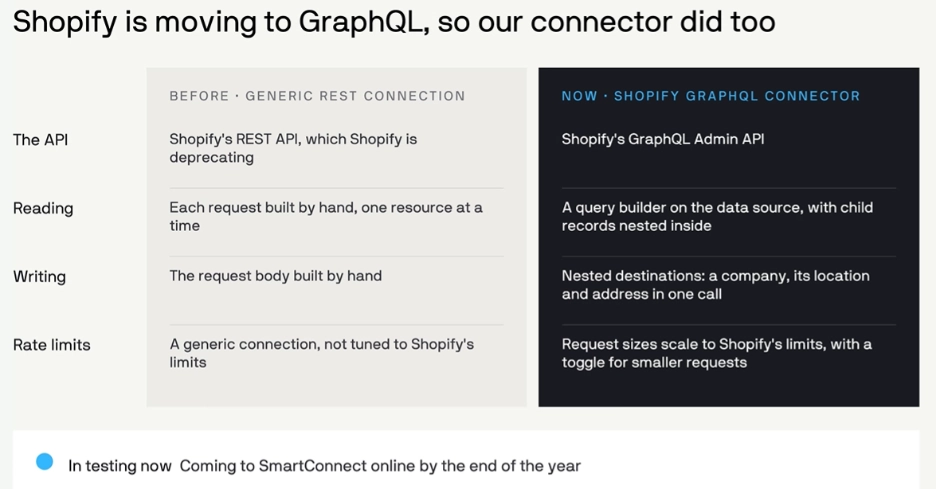
A dedicated Shopify connector has been one of our most requested connectors. Many customers already connect to Shopify through the generic REST connector, which is the second most popular generic REST connector in SmartConnect globally. The timing of this release is not only due to updates to SmartConnect, but also due to changes on Shopify’s side.
Shopify stopped adding new endpoints to its REST API about three years ago and is phasing the API out, so it will not receive bug fixes or enhancements. It also does not support Shopify’s newer features. For example, a single product used to be limited to 200 variants, but now Shopify supports 2,000.
The big change with this connector is that it is built on GraphQL.
Before now, using GraphQL on the on-premise version meant custom scripting, which we try to avoid whenever possible. The features we built for this connector will also be able to be used with other GraphQL-based APIs.
Who We Built the Shopify Connector for
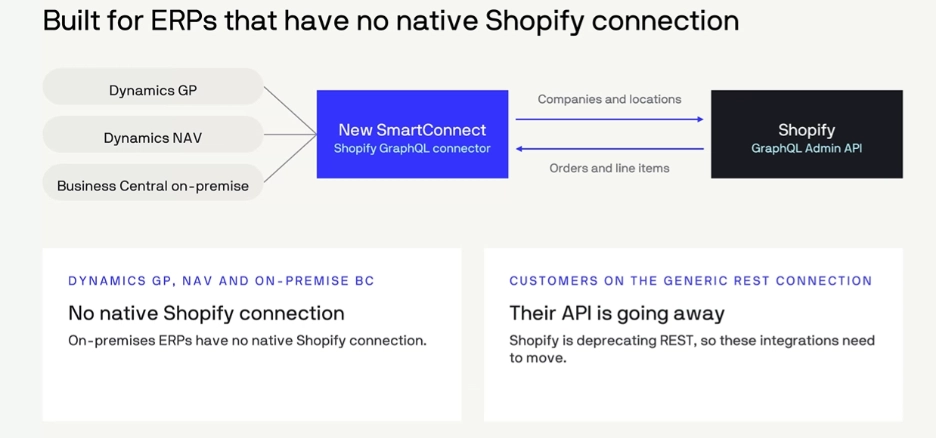
We built this Shopify connector with a specific group in mind: customers with an on-premise ERP. Most customers using generic REST with Shopify connect it to on-premise systems such as Dynamics GP and NAV. Just because your ERP is on-premise should not mean you are stuck with the old REST API and its limitations, so we are bringing GraphQL to the on-premise world.
The connector also works with all our online customers. Together, with the GP connector enhancements and other connectors on the roadmap, the Shopify connector is a great reason for existing on-premise customers to move to the new version of SmartConnect.
Reading and Writing with GraphQL
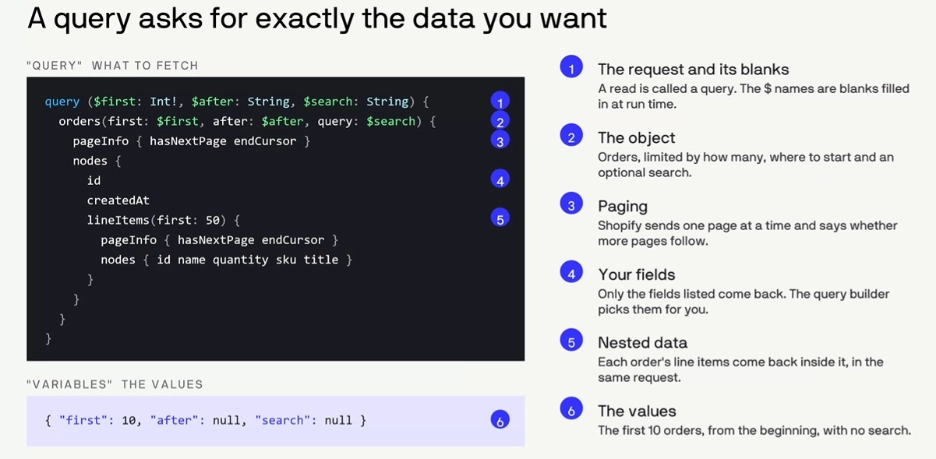
The connector can both read and write Shopify data. For reading, Query Builder lets you pull from several nested objects in one data source, such as an order along with its lines, coupon codes, and custom fields, so you can build the exact data table your integration needs. GraphQL lets you choose exactly which fields you want, and page each nested level on its own.
For writing, you can either send data to multiple endpoints in a single request, or in several. Shopify splits objects like customers and orders into small pieces, so we nested and simplified them for you. When you import a company, for example, the mapping screen shows its location, address, and primary contact together. You can also add one-to-many relationships, such as extra shipping addresses in follow-up requests.
Shopify limits how much data you can request at a given time, and each request costs more as it returns more data. The connector handles those limits, but it is still important to pull only the fields you need. The new preview with log feature shows what we sent, what Shopify returned, and what the request cost.
We also added a Shopify lookup with lookup tests, so you can try a sample value without an extra map run. Error messages from Shopify, such as an invalid phone number, appear in your run history, where you can filter and sort them.
Moving from a Generic REST Connector
Though they both connect to Shopify, integrations built on the REST connector and integrations built with GraphQL are set up very differently. This means there’s no clean way to map your current integrations to the new connector. For now, moving over means reimplementing the integration, because there are too many variables for us to build a migration tool today.
However, we do plan to provide templates to help ease the transition. You will still start over, but a template lets you focus on what was custom about your business logic and get running quickly. Our team is committed to making that move as simple as possible.
Sign up for Upcoming SmartConnect Office Hours
If you haven’t signed up for SmartConnect Office Hours and want to learn more about the other updates, it’s not too late. Upcoming Office Hours are:
- November 19: Using New SmartConnect with Dynamics NAV
- December 3: To Be Announced
