

The development of Model Context Protocols (MCPs) has revolutionized the way AI agents find information and complete complex tasks. Developers have started to build MCP servers themselves, as well as accumulating MCP server lists for others to use. Microsoft has even documented MCP server resources to help developers get started.
It’s easy to play with AI models, but if you’re looking to make a real impact in your workflow, you need to look at what goes on inside an MCP server.
What is an MCP Server?
An MCP server is the tool that connects to your MCP client and provides it with context about your business. The server is the third component of the MCP ecosystem. The three components are the host, the client, and the server.

Together, these make up the MCP ecosystem and allow you to integrate multiple data sources into your AI agent. The MCP server is the portion of the ecosystem that makes AI functionality so powerful; it enables your AI to take action.
How do MCP Servers work?
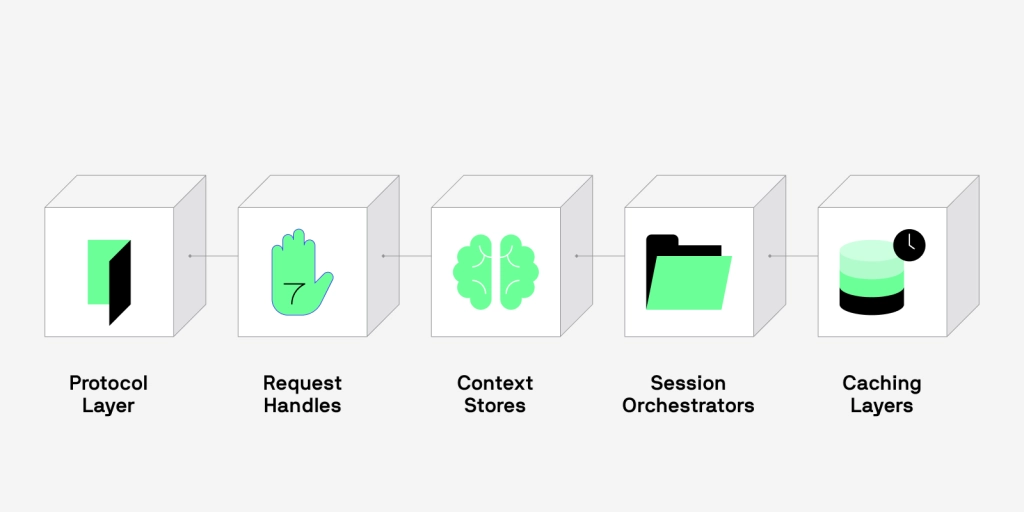
An MCP server’s main goal is to gather data, complete a task, and then send the output back to the client. Looking deeper at how MCP servers work, it helps to divide them into five main facets, so you understand all the moving pieces:
- Protocol Layer
- Request Handlers
- Context Stores
- Session Orchestrators
- Caching Layers
By splitting up MCP servers into these functionalities, we can better understand exactly how they work and what these capabilities mean for the future of AI data integration.
Protocol Layer
The protocol (communication) layer acts as the server’s front door. It takes requests, translates them into a language the rest of the server understands, and delivers responses back to the client once the server has completed the task.
The protocol ensures the client and the server stay in sync throughout the entire process and defines how structured results should be returned.
Request Handlers
This aspect of MCP servers includes tools your LLM can call on. Think of request handlers as the functions that execute tasks like:
- Information retrieval
- Sending an email
- Creating a record
- Managing workflows
- And more!
Each handler has its own command. When a request comes in, the server’s communication layer routes it to the right handler needed to complete the task.
Context Store
Giving your AI the context around your company enables your AI model to produce accurate responses. Context stores hold information short-term, giving MCP servers the ability to remember important business information between requests and ensuring quick responses.
MCP server context stores include any internal storage, like in-memory storage and databases, and makes it so the rest of the server can easily access and understand this data.
Session Management
An essential functionality of MCP servers is the ability to keep track of what’s going on throughout the server and with each connection. Session management is important to keep everything organized in the back end. This includes maintaining session data, link history, and closing out old sessions that are no longer in use.
Caching Capabilities
Another important functionality of MCP servers is the ability to cache information. Caching layers temporarily store frequently accessed data to improve performance, especially when searching through large databases for information. These layers may also cache information that would be otherwise expensive to keep retrieving.
Why are MCP Servers Important?
Each section of an MCP server has a clear purpose.
- The protocol ensures that the client and server are on the same page.
- Handlers perform specific actions.
- Context stores remember important data.
- Session management keeps everything organized.
- Caching improves efficiency.
All these capabilities of MCP servers allow you to connect your AI agent to your apps quickly and efficiently.
Benefits of Utilizing MCP Servers for AI
Don’t get left behind as AI capabilities continue to evolve. Adopting the use of MCP servers while you integrate AI into your workflow allows for:
- Integration Flexibility: Connect any and all applications you use for easy access to your data.
- Simplification of Workflows: Reduce complex tasks and encourage communication between AI and your apps.
- Scalability: As your company’s needs grow, you’ll still be able to utilize the framework of the MCP server as you integrate new platforms.
To start utilizing MCPs to make your AI agent work better for your team, find an MCP server designed specifically with data integration (and data privacy) in mind.
MCP Server Integration with eOne Solutions
As companies launch their own MCP servers, managing multiple connections becomes complicated. PopdockAI consolidates your business data into a single MCP server, giving you unified access across all your platforms.
PopdockAI MCP Integration
AI agents need to understand your business data to be useful. They need context for each query and controlled access to specific datasets for security.
PopdockAI translates your business data into natural language definitions that AI agents can understand. When you ask a question, it knows whether to search your CRM, ERP, or other systems to find the right answer.
You can embed PopdockAI’s MCP server anywhere you work, just like a Popdock widget. Each team member gets their own login with controlled data access, and you can view and act on the results directly in your workflow.
The Future of AI Integration
It’s exciting to think about the complexity of how MCP servers work and what their capabilities mean for the future of AI agents. Take advantage of AI functionality within your workflow with PopdockAI. PopdockAI’s MCP server allows you to:
- Easily connect any AI platform of your choice
- Make one simple connection to access the data your AI needs
- Get answers powered by your secure, clean, and up-to-date data
Have questions about PopdockAI’s MCP server capabilities? Contact the eOne Solutions team to learn more.
