Once Flexicoder is completely installed in Microsoft Dynamics GP 2018, registration keys will need to be entered.
To register Flexicoder in Fabrikam, Inc.:
| 1. | Open Flexicoder by going to Microsoft Dynamics GP - Tools - Setup - Sales - Flexicoder |
| 2. | On the Flexicoder window, go to Options - Register Flexicoder. |
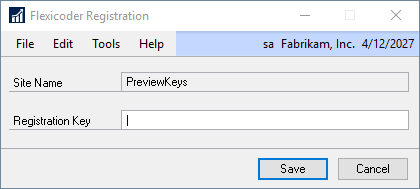
| 3. | Enter your supplied Registration Key. |
| 4. | Click on the Save button. |
To register Flexicoder in live companies:
| 1. | Add the Flexicoder Registration window to the Shortcut Bar |
| a. | Right click on the Shortcut Bar |
| d. | In the Add Window Shortcut window, expand Flexicoder - 3rd Party, and select Flexicoder Registration |
| 2. | Open the Flexicoder Registration window from the Shortcut Bar |
| 3. | Enter your supplied Registration Key |
| 4. | Click on the Save button. |